
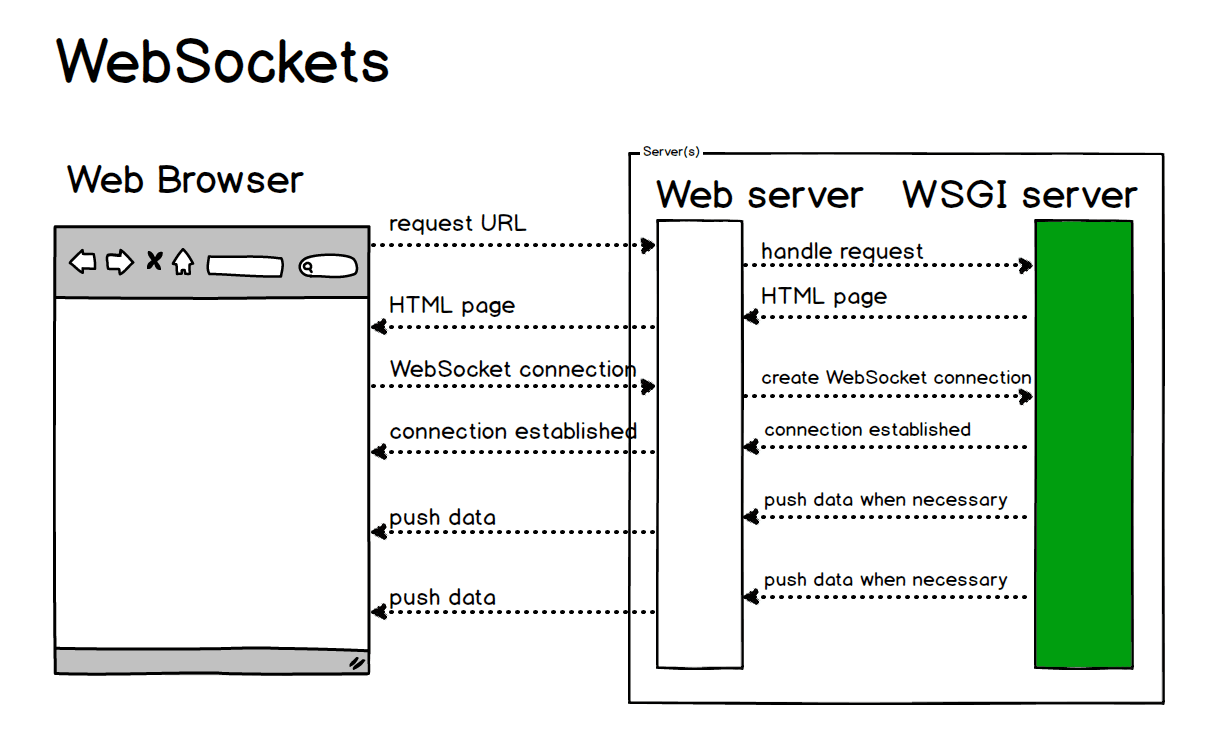
Introduction to WebSockets
WebSockets provide a persistent connection between a client and server that both parties can use to start sending data at any time. Unlike HTTP, which is unidirectional where the client requests and the server responds, WebSockets allow for bidirectional communication.
The Problem WebSockets Solve
Traditional web applications used polling techniques to receive updates from servers:
// Polling example
setInterval(() => {
  fetch('/api/updates')
    .then(response => response.json())
    .then(data => {
      // Handle updates
    });
}, 3000);
This approach has several drawbacks:
- Unnecessary requests when no new data exists
- Latency between updates
- Server overhead from managing many requests
WebSocket Protocol
WebSockets use the WebSocket protocol which facilitates a persistent, low-latency connection. A WebSocket connection starts as an HTTP request that includes an Upgrade header to switch to the WebSocket protocol.
GET /chat HTTP/1.1
Host: server.example.com
Upgrade: websocket
Connection: Upgrade
Sec-WebSocket-Key: dGhlIHNhbXBsZSBub25jZQ==
Sec-WebSocket-Version: 13
Once established, data can flow between client and server with minimal overhead.
Implementing WebSockets
Here's a simple implementation using the WebSocket API in browsers:
// Client-side
const socket = new WebSocket('ws://example.com/socket');

socket.onopen = function(event) {
  console.log('Connection established');
  socket.send('Hello Server!');
};

socket.onmessage = function(event) {
  console.log('Message from server:', event.data);
};

socket.onclose = function(event) {
  console.log('Connection closed');
};
And server-side using Node.js with the ws library:
// Server-side with Node.js
const WebSocket = require('ws');
const wss = new WebSocket.Server({ port: 8080 });

wss.on('connection', function connection(ws) {
  ws.on('message', function incoming(message) {
    console.log('received: %s', message);
  });

  ws.send('Hello Client!');
});
Use Cases for WebSockets
WebSockets excel in scenarios requiring real-time updates:
- Chat applications
- Live sports updates
- Collaborative editing tools
- Real-time dashboards
- Gaming applications
Conclusion
WebSockets revolutionize web communication by enabling real-time, bidirectional data flow with minimal overhead. While not suitable for every application, they provide significant advantages for interactive, real-time web experiences.